Universal Journal - S4IC, SAP reseller in Belgium (Revendeur SAP en Belgique)
Do you have any idea what SAP Universal Journal is?
Universal Journal - S4IC, SAP reseller in Belgium (Revendeur SAP en Belgique)

SAP Universal Journal – One Single Source of Truth

Why did SAP introduce the Universal Journal?

The Universal Journal was developed to combine into one source of data the once 2 separated Financial components:

  • Financial Accounting (FI)
  • Controlling (CO).

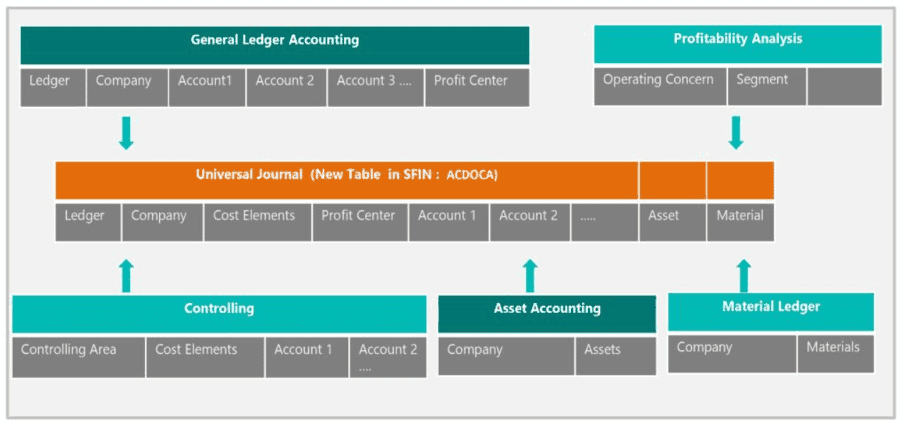
This single source of truth collects all accounting-relevant transactions into one table and makes them available to all relevant application components:

  • Financial Accounting (General Ledger),
  • Controlling,
  • Asset Accounting,
  • Material Ledger.

There is 1 combined FI / CO document linked with a logical document; all the information is recorded in 1 line item in table ACDOCA.

Wow! That’s a great deal of simplification! Thanks to SAP HANA database which is capable of compressing a lot of data and aggregating a huge number of line items in a spilt secondfacilitating the process to dispense, with separate physical line item and totals tables in each application. 

It also means that Financial Accounting and Managerial Accounting are reconciled constantly and the need for reconciliation between FI and the other Financials modules (CO or FI-AA) disappears along with the real-time integration of these components.

The reports in all components use data from the same journal, known as Universal Journal. 
SAP Journal Universel - S4IC, revendeur SAP en Belgique

In the system

Master Data 

Financials master data were fundamentally reorganized in order to have the Universal Journal up and running.

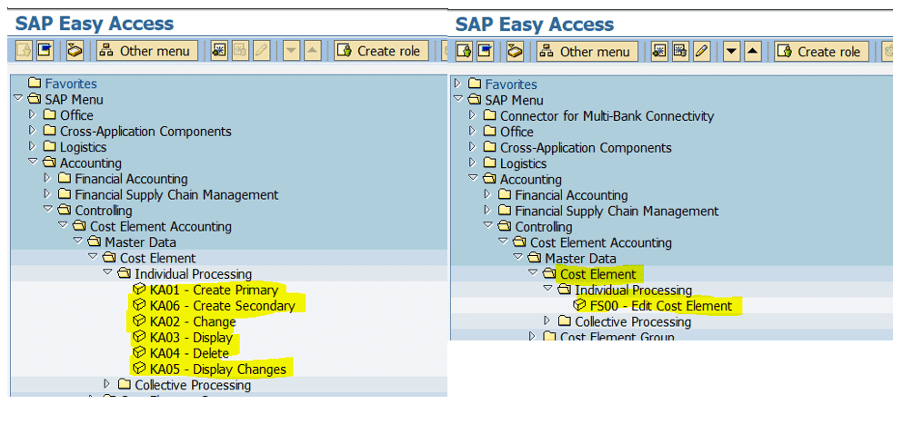
All cost elements (primary and secondary) are now merged in the G/L accounts. Therefore, we only need to maintain 1 master data that bears both the account and the cost element.

In the backend, transactions related Cost elements maintenance simply do not exist anymore.

Below screen-prints between ECC EHP6 for SAP ERP 6.0 and S/4HANA.
Master data - SAP Universel Journal (SAP S/4Hana en Belgique)

The old transactions are rerouted to transaction FS00 Edit Cost Element.

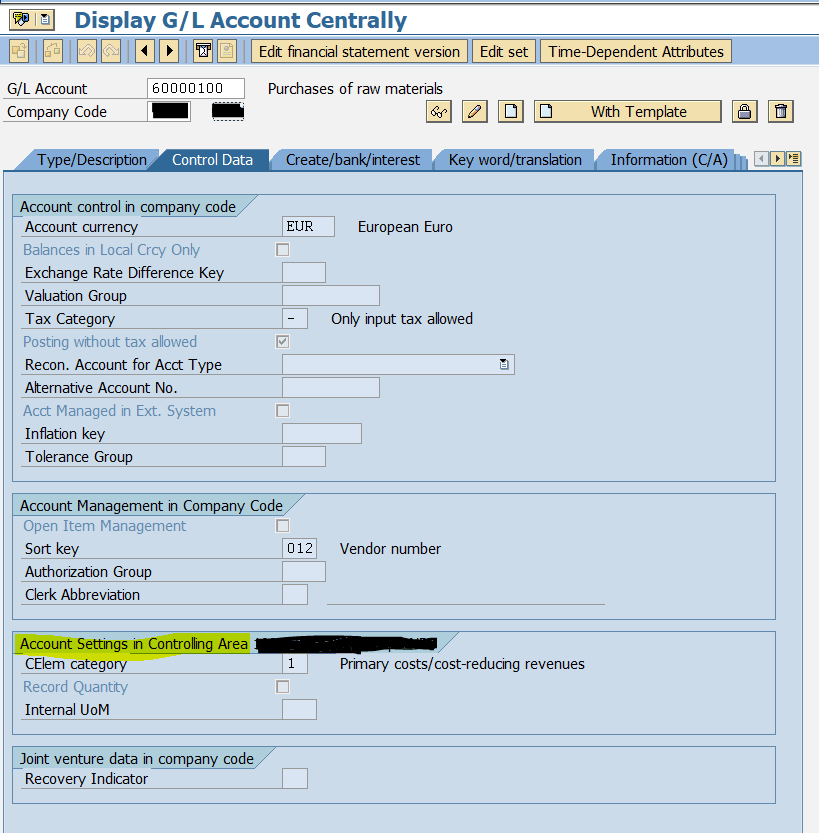
In Fiori, you only have to set up application to edit G/L account (FXXX). When editing a G/L account, the Control Data tab now includes the parameters for the Account settings in the Controlling area, revealing without any doubts that the cost element and the account are only one master data. 
Control Data tables - SAP Universal Journal (avec S4IC, revendeur SAP en Belgique)

Posting of a document

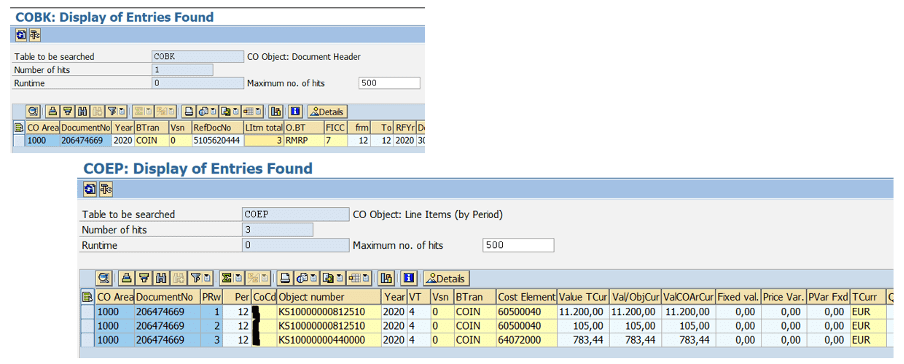
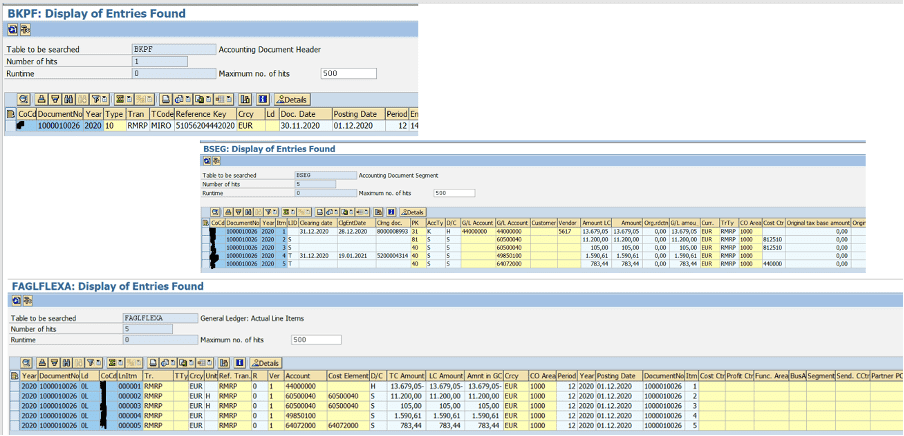
In ECC, when you post an FI document, entries in BSEG, FAGLFLEXA, FAGLFLEXT, COBK, COEJ and COEP tables (and some more BSIS, etc) are generated.

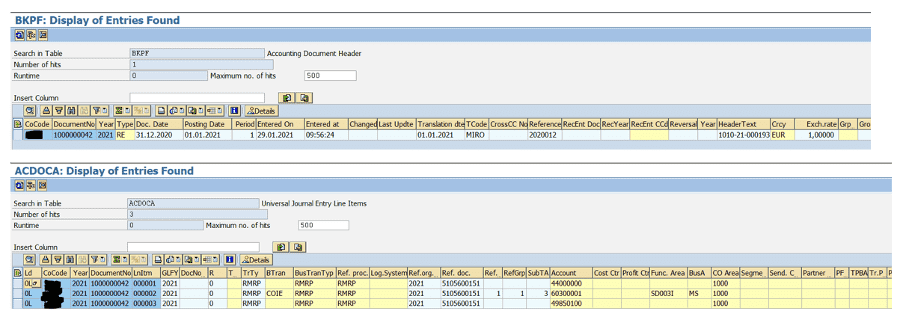
In S/4HANA, all the information are recorded in BKPF (header) and ACDOCA (line items), reducing significantly the number of tables impacted and thus, facilitating data reconciliation and reporting. 

The old tables are no longer updated but, magically the old reports are still working (for example FAGLL03 or FBL*N) because compatibility views for a data request from one of these tables read the data from ACDOCA. But, if you are using Fiori, you mind as well use the new reports since those applications are way more faster and will deliver more details than the old reports.

What will happen to old tables?

Updates are no longer made to these old tables.

Nevertheless, you can continue to use reports that use data from these old tables. This is because compatibility views for a data request from one of these tables read the data from ACDOCA. Nevertheless, it is best to use the new Fiori application to display the data since it is faster than the old reports. 

Let’s have a look at the views in these ECC tables with ACDOCA. 

FI tables
FI-tables - S4IC, prestataire SAP

CO tables

CO-tables - S4IC, partenaire SAP en Belgique

S/4HANA

SAP S/4HANA tables - SAP Universal Journal (with S4IC, SAP reseller in Belgium)

That’s it, that’s all! All FI and CO (I’ve outlined this a lot already, but a picture is better than 1000 words) combined in 2 tables. Isn’t it a beauty? 

Furthermore, CO-PA is also embedded in the Universal JournalCO-PA documents simply do not exist anymore.

SAP best practices recommend the use of an account-based COPA with real-time integration. It lets you acknowledge the impact on your result and margin in real time without having to settle the objects in CO-PA. The characteristics are derived and available the moment you post them in the system.

If you define a new characteristic, you can generate them in ACDOCA. You just must extend the CDS views to be able to view it in the standard reports.

With the Universal Journal and real-time CO-PA, you don’t have to wait for month-end to have your full P&L. You can also leverage the predictive analytics. 

With the Universal Journal, the ‘old’ CO-PA tables are outdated.

See the table below for the comparison:

Tables

Costing based

Account based

SAP S/4HANA

Actual line items

CE1XXXX

COEJ

ACDOCA

Plan line items

CE2XXXX

COEP

ACDOCP

Totals records per profitability segment

CE3XXXX

COSS, COSP

ACDOCA

Profitability Segment definition

CE4XXXX

CE4XXXX

CE4XXXX

Note that for the plan, SAP is working on a Plan Universal Journal (ACDOCP). It is still under construction and not all functionalities are available yet (referring to On-Premises 1909 version). 

Conclusion

In a single entry (well let’s just say in one entry for a specific document) all the FI and CO information is centralized in that table.

It could have not been achieved without the power behind SAP HANA database technology.

SAP is continuing the work and is pushing toward the Plan Universal Journal. Thus, it will then be easier to plan (looking like it’s done in BPC) and compare the data with the actuals; especially when using the reports in BW embedded.  

Share

Copyright S4IC – 2021​

Greenfield vs Brownfield migration
SAP S/4HANA migration: which approach is best for your business? Greenfield, Brownfield or Hybrid?
Greenfield vs Brownfield migration

SAP S/4HANA migration: which approach is best for your business? Greenfield, Brownfield or Hybrid?

Whether it’s a migration or an implementation, you’ll need to move to SAP S/4HANA.

In both cases, success depends on :

  • Your strategy
  • Your team
  • Your approach

Three approaches are generally proposed: Greenfield, Brownfield or Hybrid.    

What is a Greenfield or a new implementation?

In a Greenfield deployment, you start from scratch: all used functionality is reanalyzed and reconfigured based on the best practice. Data is extracted from the old system, processed and reloaded into the new one. 

This approach is generally recommended: 

  • If you want to benefit quickly from new technologies;
  • If you have accumulated to many specific developments;
  • If your current processes are no longer efficient;
  • If your core business or corporate strategy is changing rapidly;
  • If you are just starting out in SAP.

Note that a Greenfield approach is a time-consuming process because it requires a complete analysis of the processes to make the most of the new functionalities offered by SAP S/4HANA. This approach implies a significant contribution from business specialists to ensure the conversion of data. 

What is a Brownfield or a system conversion?

A Brownfield is an upgrade of an existing system. It is essentially a technical operation at the system level. This means that the data and the specific programming are maintained as they are. The new digitization-specific functionalities are activated afterwards.


SAP recommends this approach in the following cases:

  • If your organizational structure has not changed and your system contains little specific development;
  • If the objective is the gradual implementation of new functionalities;
  • If your current processes are efficient;
  • If your existing system is well adapted to your core business or your corporate strategy;

A Brownfield approach can be quick and does not require much of your business specialists. But as there is no data cleansing, it is recommended to accompany it with an archiving project.

Since 2021, it is officially possible to combine Brownfield and Cloud migration. We did it in 2020 in our collaboration with Touring.

What is a hybrid deployment?

An hybrid deployment is the combination of a Brownfield and a Greenfield.  

It aims to leverage the benefits of both approaches: on the one hand it reuses the customizations and developments of the existing ERP, and on the other hand enriches or replaces them with the new functionalities of SAP S/4HANA.  

Brownfield, Hybrid and Greenfield migration

BROWNFIELD

HYBRID

GREENFIELD

From an ERP SAP.

From an ERP SAP.

From a non-SAP ERP or an ERP SAP.

Overall satisfied with existing ECC6.

Some parts of ECC are to be kept, others are obsolete.

The current system is obsolete.

Step by step update.

Mixed solution

Migration in one step.

The innovations can be integrated into S/4HANA later on.

Mixed solution

S/4HANA functionalities are integrated from the beginning.

Upgrade of the current system.

Combination of Greenfield and Brownfield. 

Development from scratch, new implementation.

Upgrade of existing codes.

Analysis and recovery of existing useful codes and upgrade.

Development of new code based on best practices.

Functionalities of the old system are kept.

In cases where the standard functionality changes, SAP provides migration tools.

Mixed solution

Features based on best practices.

All new features are activated immediately.

The data is already in the system and some is subject to a specific conversion, such as customers and suppliers.

Data selected and reloaded into the new system.

Data are loaded into the system.

Short and mainly technical migration project. 

Mixed solution

Long and mainly business migration project. 

Migration strategy

In your SAP S/4HANA migration or implementation strategy, you will need to define whether you stay On-Premise or move to the Cloud.

Your migration team

Migrating to SAP S/4HANA requires the right team within your company. You’ll need to select employees who know your business process inside and out. 

In most cases, it is difficult for a company to manage a migration to SAP S/4HANA alone. You will definitely need external support. 

As a team of experienced SAP consultants, S4IC has been involved in many SAP S/4HANA migrations. We have developed specific tools to facilitate the migration from SAP ECC to SAP S/4HANA On-Premise and in the Cloud.

Do not hesitate to contact us if you need more details or advice for your journey to SAP S/4HANA.

Share

Copyright S4IC – 2021​

SAP Leonardo - Transformation digitale avec S4IC (Partenaire SAP en Belgique)
SAP Leonardo: an innovative model for digital transformation 
SAP Leonardo - Transformation digitale avec S4IC (Partenaire SAP en Belgique)

SAP Leonardo: A Digital Transformation Model

Image de Constance Barbier

Constance Barbier

Digital Communication Specialist

What is SAP Leonardo? 

SAP Leonardo is a solution portfolio that brings together several technologies available on the SAP Cloud Platform (including APIs, microservices and integration modules) while using SAP’s HANA database or data administration system (Data Hub and Vora).

SAP Leonardo is neither a product nor a solution marketed by SAP but a concept that uses emerging technologies to support companies in their internal digitalization process.

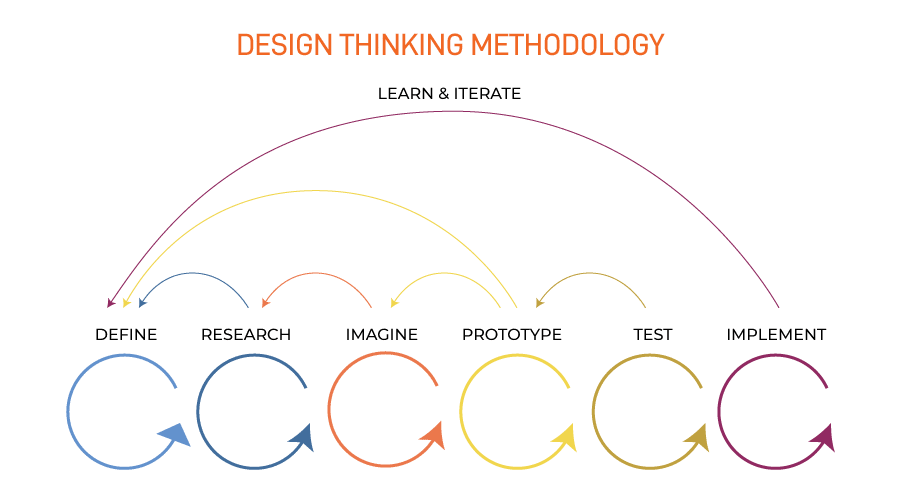
In addition, SAP Leonardo is inspired by the iterative methodology of « Design Thinking », which enables collaborative, creative problem solving with a human-centered approach.

Design thinking - SAP Leonardo (Transformation digitale)

In this innovation process, and following the example of the Agile method, user feedback is integrated at each stage of the project. Design Thinking saves a lot of time and leads to a high level of satisfaction. Research has shown that a product or service increases its potential for success if the customer is an integral part of the development process. This methodology is not new in itself, but the simple fact of combining it with cutting-edge technologies allows to optimize the company’s processes and data processing

What are the benefits of SAP Leonardo for your company? 

Today, the ability to automate has been refined by emerging technologies based on artificial intelligence (AI). SAP Leonardo uses these intelligent tools to mine data, detect patterns, predict outcomes, and suggest actions, all of which support better decision making. They revolutionize your processes and business model to enable you to deliver products and services faster to your customers.

SAP Leonardo is based on real-time data analysis of your business.  Running only on the new SAP S/4HANA release, SAP Leonardo helps you to:
  • Create new opportunities;
  • Automate certain tasks;
  • Increase the performance of your operational services and as a result ;
  • Be at the forefront in terms of customer service.
  • Improve performance, reduce costs and waste through prevention and automation

In short, a smart business using SAP Leonardo effectively leverages Big Data to turn it into business value. This data is processed in real time by the SAP HANA system, allowing you to achieve desired results faster and with less risk.

Emerging technologies used by SAP Leonardo

These different technologies can be used individually but for optimal results, it is strongly recommended to use them all together.

This set of interrelated technologies transforms stored data into structured and usable data. But for these technologies to work effectively within SAP and improve your business performance, three critical elements must interact:  

  • Business data;
  • The users; 
  • Business processes. 

The preparatory phase is fundamental in this process. As you can see, SAP Leonardo has been designed to meet three objectives:

  • To help companies innovate quickly and efficiently.
  • Integrate innovation into the company’s business.
  • Evolve innovations to increase their value.

But it’s also much more than that; SAP Leonardo adapts to your core business, your business needs, the challenges you face… You have to test it to understand the extent of what it can do for your company!

Share

Copyright S4IC – 2021​

SAP for Insurance moduls - SAP Assurance
SAP for Insurance : how do the modules work together?
SAP for Insurance moduls - SAP Assurance

SAP for Insurance: how do the modules work together?

Digital transformation is becoming a necessity for companies in various industries. But more specifically, what does SAP for Insurance offer insurers? How do the modules communicate with each other and how does it all fit into SAP’s S/4HANA landscape? 

SAP for Insurance Architecture

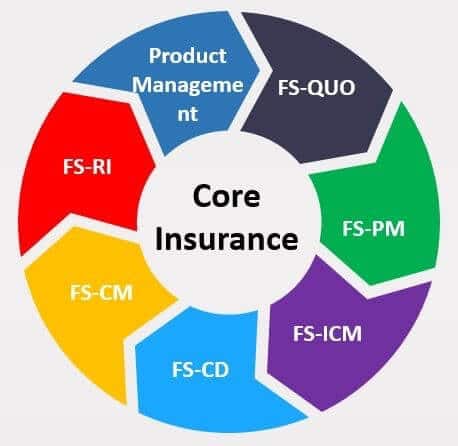
At first, let’s take a closer look at the key modules that are incorporated within SAP for Insurance. Below is the diagram of SAP for Insurance architecture with core modules highlighted in green.

SAP insurance architecture diagram - SAP Assurance

Key modules of SAP for Insurance offer below functionalities:

Product Management Component

This component is used to create customized insurance products and it’s corresponding formulas and rules. Sometimes it is referred to as the calculation engine, since it is called during runtime to calculate various data on the insurance policy.

Here we have two distinctive solutions offered as standard tools from SAP:

  • msg.PM – Msg.Product Manager: introduced at first as the only calculation engine, msg.PM has two components: PM.Designer (this component is used to develop, manage and test insurance product data) and PM.Runtime (this is a runtime component that delivers product data and once called it executes insurance calculations).
  • FS-PRO – SAP Product Lifecycle Management for Insurance : it was introduced mainly as a go-to solution for P&C and Auto lines of business (though msg.PM can also handle those LOBs besides Life and Pension insurance). The main component of FS-PRO is Insurance Product Configurator. Insurance Product Configurator consist of three main parts: Administrative Console (component that handles management of system, application and user profiles), the Product Configurator (main component which is used for development and management of a portfolio of insurance products) and the Product Web Services (connectivity component that enables use of product data to other components in the SAP for Insurance landscape).

Deciding whether to use msg.PM or FS-PRO depends on particular business requirements and should be determined per insurer

FS-QUO – SAP Quotation and Underwriting for Insurance

This module is used for making insurance quotes and handling underwriting processes (together with FS-PRO). Some of the key features of FS-QUO include:

  • Create an insurance quote – Either full quote or quick quote with only partial information.
  • Simulate underwriting – Check underwriting rules and decision by running a simulation.
  • Submit a quote for underwriting – Execute underwriting tasks on a quote to get an underwriting decision.
  • Manage quote options – Compare quotes, assign and reassign quotes, delete a quote, create tasks for the quote, etc.
  • Request Cash Before Cover payment
  • Issue a policy from a particular quote
SAP Quotation and Underwriting for Insurance - SAP Assurance

FS-PM

With FS-PM insurers can handle their entire policy life-cycle. As it represents the heart of SAP for Insurance software suite we are going to explain it in more detail. Some of the main functionalities include:

  • New Business for creation of insurance policies;
  • Inquiry for displaying various policy data;
  • Change business process for executing any kind of changes on the policy. Standard delivery of business transactions include various Life, Non-Life and Auto business transactions;
  • Universal Change process to correct any field on the policy (used mostly when Change business process business transactions are not available);
  • Reversal business process to end the policy manually;
  • Reset business process to revert any kind of changes that already happened on the policy;
  • Renewal business process to renew the policies in bulk;
  • Update business process to execute update of policies in bulk.

FS-CD

This is the central booking system for handling incoming and outgoing payments coming from FS-PM, FS-ICM and FS-CM. Some of its main functionalities include:

  • Open item accounting
  • Payment processing
  • Dunning
  • Interest calculation
  • Broker collections
  • Correspondence

FS-ICM

Very flexible Incentive and Commissions Management module which can be used to facilitate any broker and commission contract structures, rules and calculations. Together with FS-ICM, PFO module is used for Portfolio assignment.

Some of the main functionalites of FS-ICM are listed below:

  • Serves as an incentivizing Salesforce tool to improve sales and gain more clients
  • Maintenance of the legal commission contracts with brokers and agents
  • Calculations of remunerations for any action in the system that requires that
  • Settlement of commissions to the target settlement system
  • The main functionality of PFO is to manage, assign and reassign relationships between insurance policies and commissions contracts
Module de gestion des incitations et des commissions - SAP Assurance

FS-CM

Is used to handle claims from notification to fulfillment and recovery. Main Processes within Claims Management are listed below:

  • Claim Notification
  • Claim Handling
  • Claim Fulfillment
  • Claim Recovery

FS-RI

It represents a complete Reinsurance solution from SAP. This module is integrated with primary insurance modules and some of its main functionalities include:

  • Contract Administration
  • Management of Assumed, Ceded and Retroceded treaties
  • Reinsurance Accounting
  • Reinsurance Claims Processing
  • Financial Reporting

Integration between SAP for Insurance modules

This solution is delivered with a predefined set of standard products which can be used to create sample policies and show sample flows in the system, so-called Sample Content. It’s possible to enable integration within SAP for Insurance with little configuration and immediately see the results by trying out some of the Sample Content data.

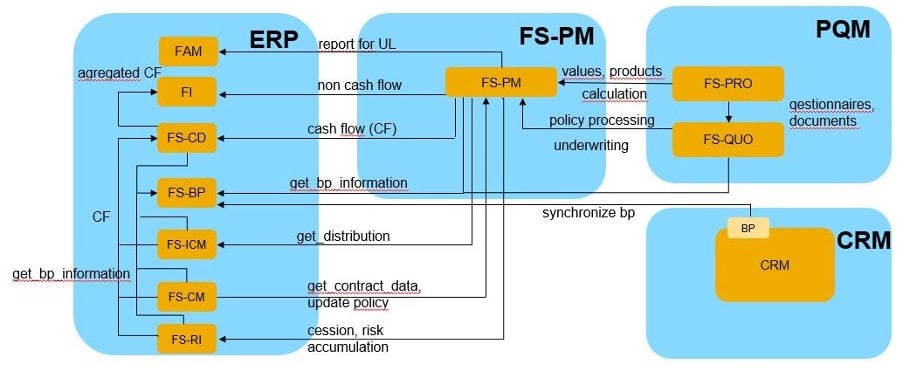
When looking at the separate modules, the heart of SAP for Insurance suite is FS-PM. This policy administration component is responsible for triggering most of the connection points between separate modules.

Integration between SAP modules for insurance - SAP Assurance

At first, during design time, Product Management components (whether msg.PM or FS-PRO) import part of the product structure to FS-PM. Sales product from product management components can be seen as a template based on which insurance policies are created. Therefore, insurance policy in FS-PM represents one instance of a Sales product designed in either of product management components.

During runtime, this insurance policy in FS-PM calls product management component to calculate premium, sum insured and other calculation-relevant data. This is realized by FS-PM aggregating and sending relevant data to the product management component which in turn uses this data, calculate the results and sends it back to FS-PM.

This type of integration is possible on every change on policy in FS-PM throughout the policy life-cycle. Once the insurance policy is properly calculated and the process is about to be completed, FS-PM calls other interfaces and sends them relevant data.

FS-PM aggregates commission relevant data and sends it to FS-ICM. FS-ICM will trigger FS-CD to create a payment for the commission. The same applies with FS-PM to FS-CD interface, where FS-PM creates all cashflows and sends them to FS-CD. In case a claim happens, FS-CM will call FS-PM to request policy data, so-called policy snapshot. In that case, FS-CM will call in-built functionality in FS-PM to collect relevant insurance policy data which is needed further for claim creation and processing. Once the claim is processed, FS-CM will call FS-CD to create an outgoing payment to reimburse the beneficiary for the loss that occurred.

When it comes to integration with other SAP S/4HANA modules, SAP for Insurance uses BP (Business Partner) data for all it’s participants. All FS modules have built-in functionalities to use data from BP module whether in the background or jump via the user interface to display relevant participant and its data. Non-cashflow documents are sent to FI-GL (General Ledger Accounting), while cashflows are sent to FS-CD.

CRM uses BP data and can trigger quotations via FS-QUO. Reporting requirements are realized by extracting data from FS modules via data extractors and by transferring it to BW to be used as a basis for reporting.

Le CRM utilise les données BP et peut déclencher des cotations via FS-QUO. Les exigences en matière de reporting sont réalisées en extrayant les données des modules FS via des extracteurs de données et en les transférant à BW pour servir de base au reporting.

All in all, this was just a brief introduction to SAP for Insurance and its main functionalities. SAP’s software suite for the insurance industry definitely offers a wide range of functionalities for insurers of all sizes and all lines of business and as such it is one of the most complete insurance solutions on the market. If you want to learn more about SAP for Insurance, please contact us, our experts will give you more precisions.

Share

Copyright S4IC – 2021​

Data migration - S4IC, votre partenaire SAP
Why choose SAP S/4HANA ?
Data migration - S4IC, votre partenaire SAP

Why should you use SAP S/4HANA?

Access to smart and emerging technologies

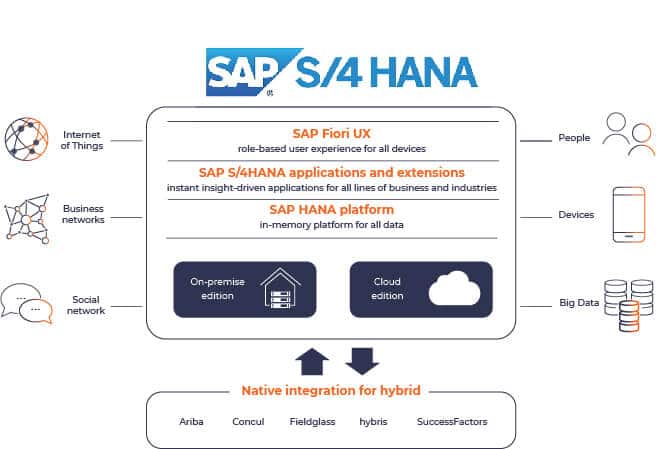
Differentiating yourself from your competitors by leveraging the latest technologies has become inevitable. SAP S/4HANA is the ERP that enables you to achieve your digital transformation goals.

Optimizing your service chain by using automation, artificial intelligence, IoT, machine learning, or blockchain is a priority. You reduce the risk of error from human intervention and allow your staff to focus on higher value tasks. From procurement to billing to product or service delivery, companies that want to stand out have a card to play with emerging technologies.

Technology leap with SAP HANA

SAP HANA is a database that stores data in RAM for faster processing. SAP HANA is a leader in the Big Data market. It allows the processing of huge volumes of data, in real time. With this type of technology, there is no more batch processing, the data model is simplified and the decision process is accelerated. 

It was specifically designed to be the foundation for intelligent technologies and automation processes. Installing SAP HANA is preparing for emerging technologies. 

SAP HANA is much more than a database. It provides advanced search, analysis and data integration capabilities for all types of data. It also functions as an application server and helps companies build intelligent applications based on real-time data, in-memory computing and machine learning technology.

SAP S/4HANA is the new suite designed to run on SAP HANA and no other database. This means users can access data from anywhere in real time for planning, execution, prediction and simulation. 

Cloud offering

SAP S/4HANA brings you additional flexibility compared to ECC or most non-SAP ERP: available in a public or private cloud, on-premise, or in a hybrid environment.

Cloud offerings open the door to new approaches in managing your ICT department. You have the opportunity to outsource all or part of your IT services. You can benefit from specific expertise in the areas of security, data storage, …

The SAP S/4HANA Cloud editions, Public and Private, allow you to focus on your core business, while software hosting and maintenance are outsourced. Applications, application servers, database, operating systems and hardware are supported and secured by SAP.

What is the best option for your company? In a hybrid environment, what is the best mix of on-premise and public/private cloud for you?

In the article SAP S/4HANA: Cloud, On-premise or Hybrid? we go into more detail about the advantages and disadvantages of each solution.

Real-time data volume and predictive analytics

We are no longer limited in terms of the volume of data stored with SAP S/4HANA. In addition, your staff, customers and suppliers have access to real-time data, which has a significant impact on improving your business. You have a real-time view of inventory (raw materials, consumables and products), location and activities of your teams. 

Thanks to the predictive power of analytics, you are able to optimize your decisions and anticipate actions that will benefit your business

The ability to analyze large volumes of data in real time allows you to increase the commercial value of your business. 

Fiori and access to other SAP products

Fiori is the new SAP S/4HANA user interface. It replaces the SAP GUI.

Modern, customizable and intuitive, Fiori is an intelligent assistant that takes advantage of artificial intelligence and machine learning. Switching to Fiori is recommended for the ergonomic, graphical, practical and aesthetic improvements it brings.

With SAP S/4HANA, the SAP GUI remains available. However, some new functionalities are only available on Fiori, such as FSCM-BAM (bank account management module).

With SAP S/4HANA, you get an integrated environment with access to data from several SAP products such as Ariba, Concur, Fieldglass, Hybris or SuccessFactors. With Fiori, you have access via a single interface.

SAP S/4HANA Cloud or On-Premise

2027 As deadline

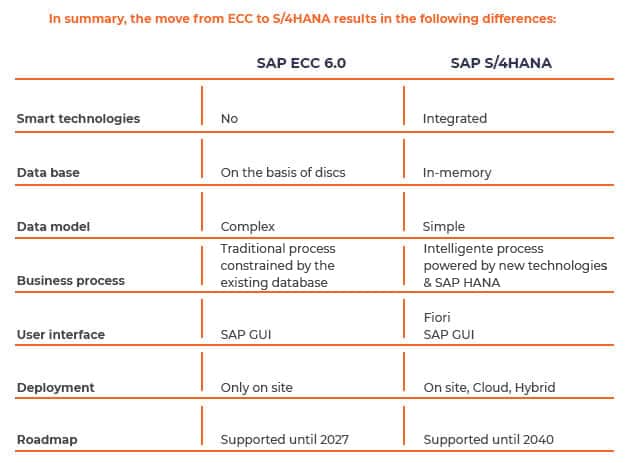
The table below summarizes the main differences between SAP ECC6 and SAP S/4HANA. 

Differences between ECC and SAP S/4HANA

The gap between the functionalities of SAP S/4HANA and ECC6, in a context of digital transition, makes ECC6 obsolete. Companies get a real competitive advantage by switching to SAP S/4HANA. For this reason, SAP will no longer support and maintain ECC from 2027. 

Since the migration to SAP S/4HANA is inevitable, it is best to consider it as soon as possible. Waiting until the last minute and paying in the meantime for developments that meet the specific needs of the business will only add to the bill. Indeed, these needs could be integrated into a global and coherent analysis taking into account the potential offered by SAP S/4HANA. 

An implementation or a migration to SAP S/4HANA implies a major technical overhaul.

As an SAP reseller, do not hesitate to contact us to evaluate the time and duration of such a project based on an analysis of your business, your constraints and your objectives.

If you decide to take the plunge and move to SAP S/4HANA, the first questions you’ll ask are related to the type of deployment.

Three scenarios are possible:  : 

  • Greenfield or New Implementation means redesigning your processes and applying standard functionality and industry best practices.
  • Brownfield or System Conversion is the fastest deployment because your existing configuration, customizations and historical data are preserved.
  • Hybrid Deployment combines the concept of Greenfield and Brownfield in the configuration and customization and even retains some historical system data.

The choice between a Greenfield, Brownfield or Hybrid deployment depends on several parameters that we analyze in detail in the article SAP S/4HANA migration: which approach suits your company best?

The choice between IaaS, PaaS and SaaS should also be included in your approach to moving to SAP S/4HANA.

Share

Copyright S4IC – 2021​